Everything Your Boutique Needs. Nothing It Doesn't.

BridalOp replaces your POS, booking tool, inventory tracker, invoicing system, contract manager, and a dozen spreadsheets — with one beautiful platform.

Point of Sale

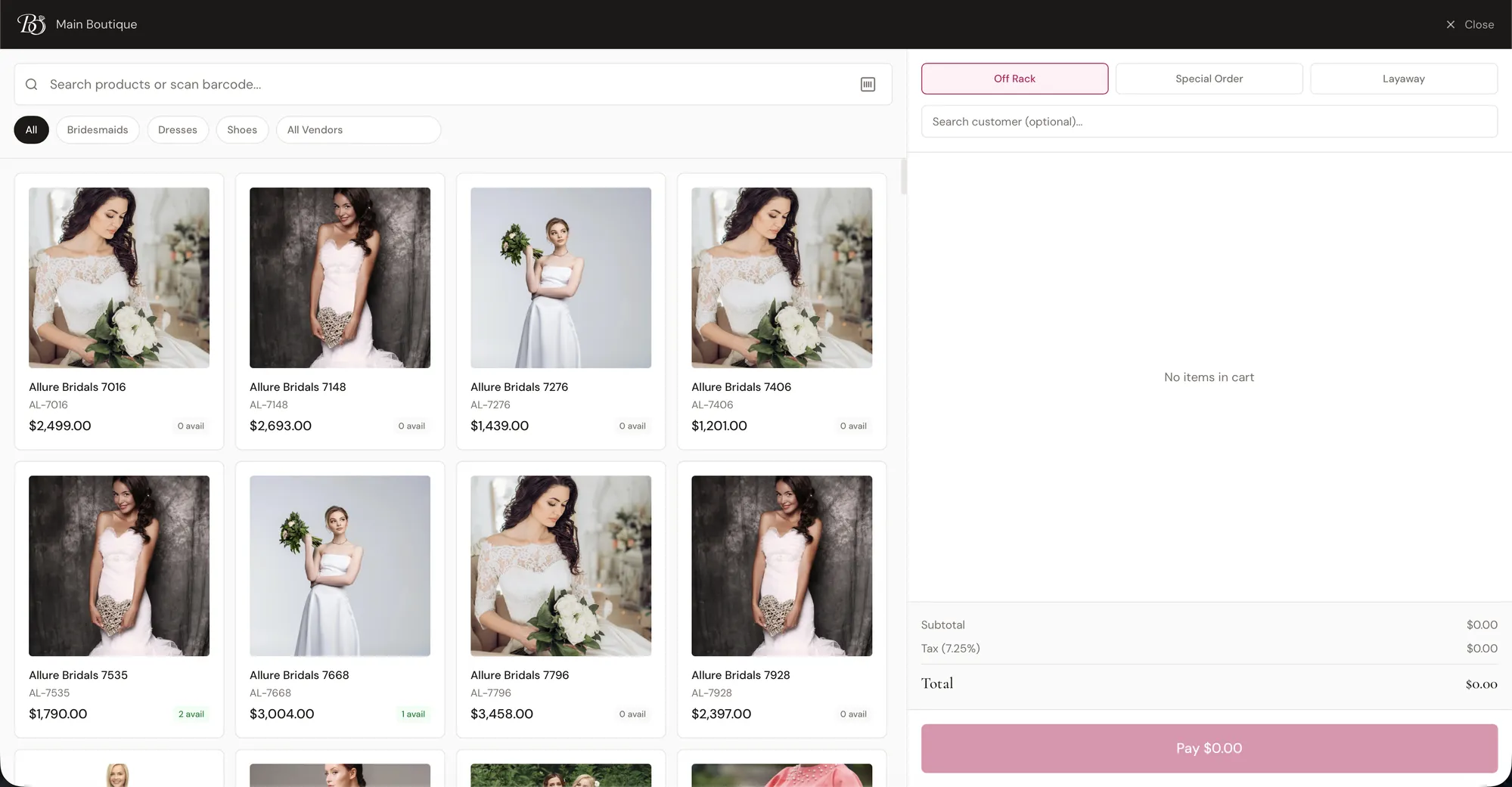
A full-featured POS terminal designed for bridal, with product search, barcode scanning, discounts, contracts, and layaway built right into the checkout flow.

Point of Sale

Full POS terminal

Search products by name, scan barcodes, or browse your inventory picker to build orders fast.

Stripe & Square support

Connect your own Stripe or Square merchant account. Your money goes straight to you, not through us.

Multiple payment methods

Accept cash, card, gift card, and saved-card payments. Split a single transaction across methods.

Discounts & promo codes

Apply per-line discounts by dollar or percent, and redeem promo codes right at checkout.

Contracts at checkout

Attach a contract template to a sale and have the customer sign on-screen before completing the order.

Sold-by tracking

Tag each sale with the consultant who made it. Commission calculations happen automatically.

Wi-Fi card readers

Take tap, chip and swipe payments on a Stripe or Square reader, with tipping on the device. Bring your own hardware — no rental fees and no added transaction fee from us.

Per-item sales tax

Turn tax off on the products that should not carry it, like services, or override a single line at the register.

Digital receipts

Email a beautifully branded receipt or print it on your receipt printer. No paper waste required.

Layaway plans

Create a layaway plan at checkout with custom payment schedules. Customers pay over time.

Special orders at checkout

Create a special order for the customer right from the POS. Measurements, rush fees, and ETA all captured in the sale.
Online Booking

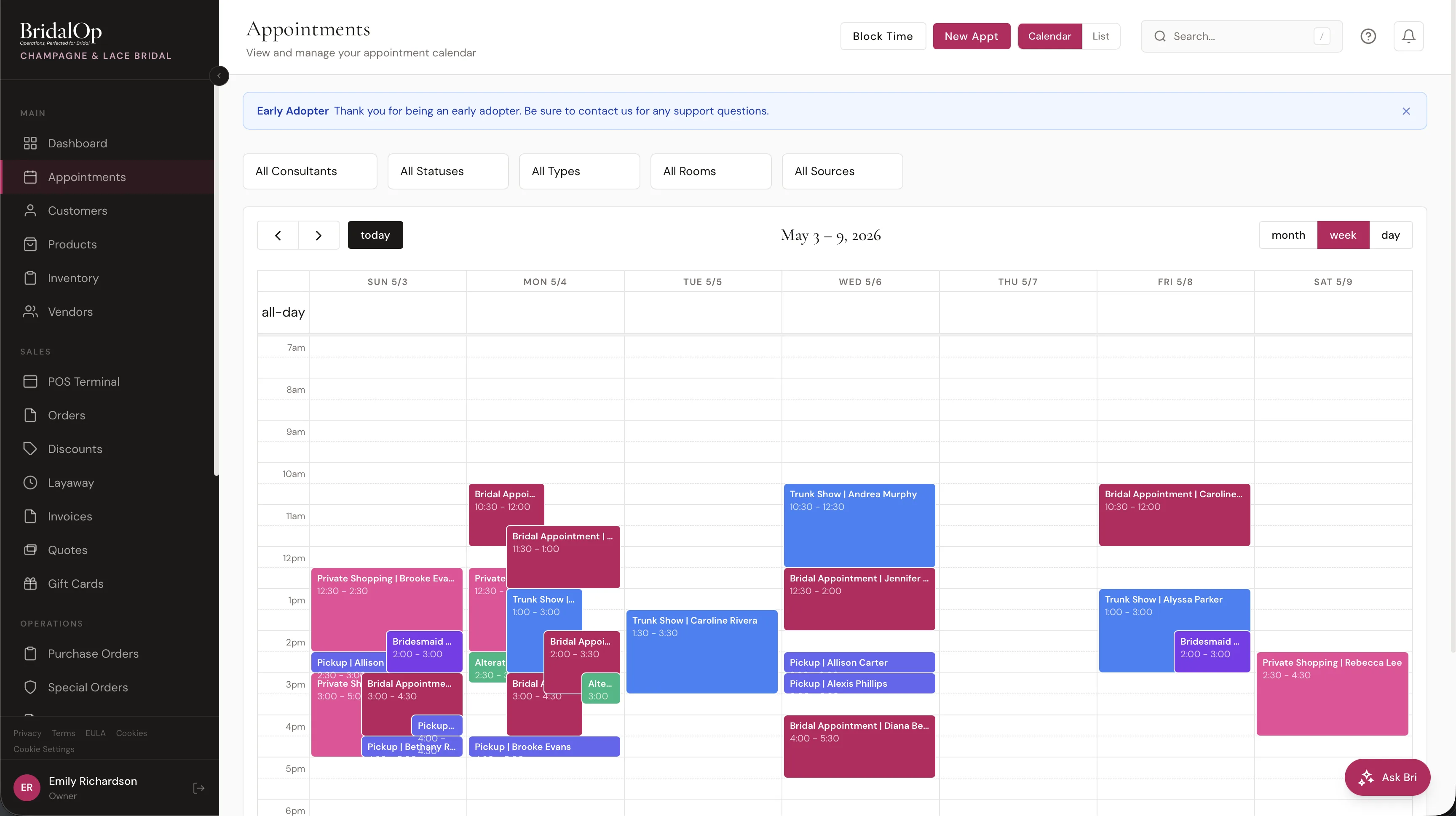
Give brides a polished, branded booking experience. Manage appointments, fitting rooms, confirmations, and reminders from one calendar.

Online Booking

Public booking portal

Customers book through your own branded URL, or you share the link directly.

Embed it in your own site

Paste a snippet into WordPress, Squarespace, Wix, Shopify or a hand-built page and the form appears inside it, with your header, footer and branding intact. It resizes as she moves through the steps, so she never leaves your site.

Custom appointment types

Define appointment types with custom duration, pricing, and deposit requirements. Bridal, alterations, pickup, prom, and more.

Fitting room management

Assign appointments to fitting rooms so you never double-book a space. See room availability at a glance.

Custom booking form fields

Add your own questions to the booking form: wedding date, budget, dress style preferences, party size, and anything else you need.

Automated emails & SMS

Send confirmation, reminder, and follow-up messages automatically. Reduce no-shows without lifting a finger.

Google Calendar 2-way sync

Appointments sync to and from Google Calendar in real time. Block personal time and it reflects in your booking availability.

Calendar time blocks

Block time for breaks, trunk shows, staff meetings, and vacations. Blocked times won't show as available to customers.

Party size tracking

Know how many guests are coming with the bride so you can prepare your space and staff accordingly.

Staff-only appointment types

Keep pickups, alterations fittings and trunk shows usable by your team while hiding them from the public page. Group the rest into customer-facing categories so she picks what she is here for.

Offer codes on appointment fees

Staff-only codes your team can apply while booking — a rate you offer a warm lead on the phone stays off the internet. The report shows what each code cost and how many of those appointments were actually kept.

Multiple booking sources

Track walk-ins, phone bookings, and staff-created appointments alongside online bookings. Every source on one calendar.

Customer Management

Every bride gets a rich profile with wedding details, measurements, notes, and full history. Know your customers the way they deserve.

Customer Management

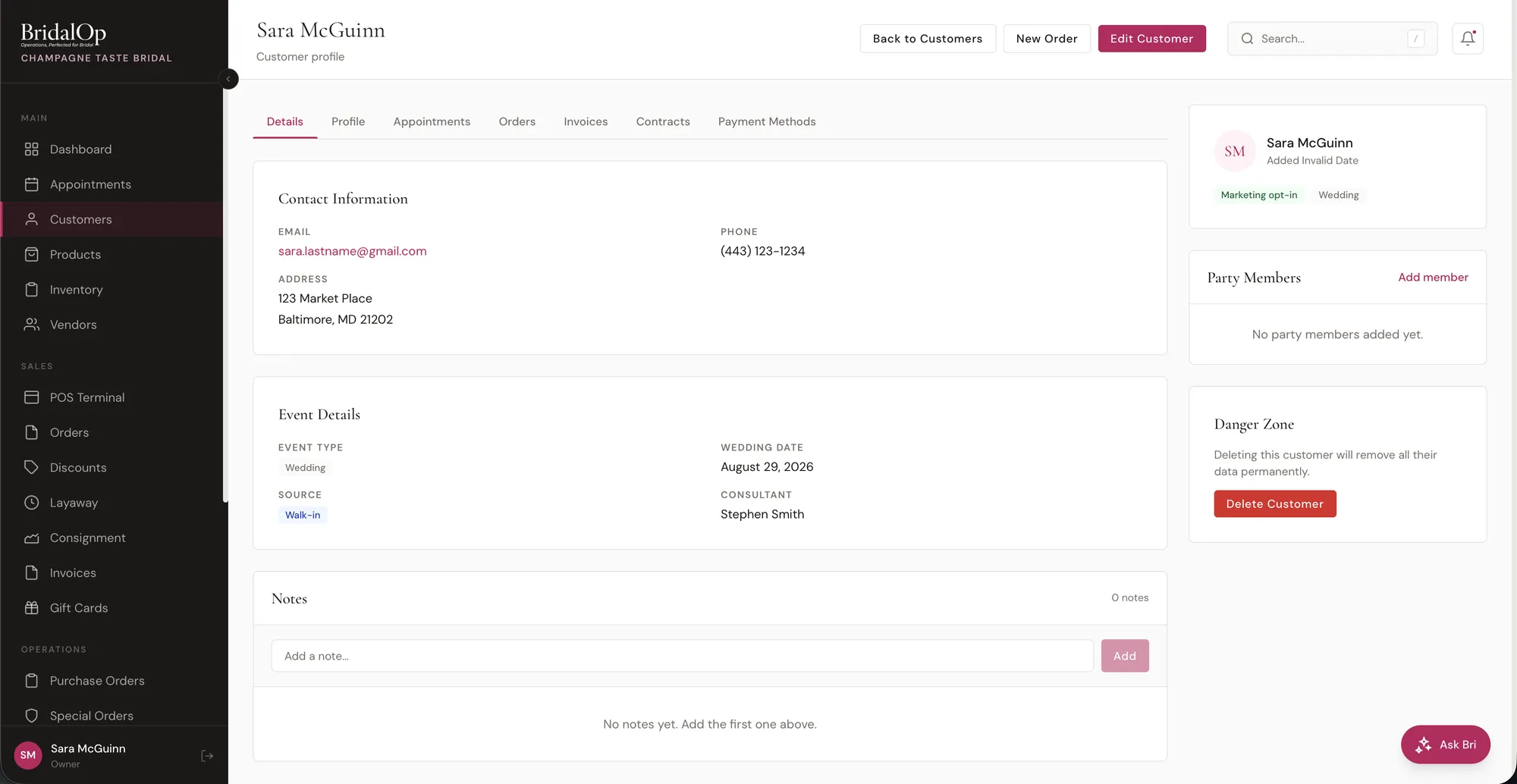
Rich customer profiles

Store wedding date, event type, measurements, and any detail that matters to your boutique on every profile.

Custom profile fields

Add text, select, date, checkbox, and other field types to capture the data unique to your business.

Notes & party members

Add internal notes and track bridesmaids, mothers, and other party members linked to the bride's profile.

Complete history

See every order, appointment, and invoice for a customer in one place. No more digging through separate systems.

Saved payment cards

Securely store cards on file via Stripe or Square for quick checkout and auto-charge on layaway schedules.

Marketing opt-in tracking

Track email and SMS marketing consent per customer. Stay compliant and know who you can reach.

Customer forms

Build questionnaires — style consultation, measurement intake, post-appointment survey — and send them by email and text. She fills them on her phone with no login, and the answers land on her profile.

Lookbook links

Share a curated, customer-facing catalog with a bride and let her browse what you picked out for her.

CSV import

Import your existing customer list with smart column matching. Map fields your way and BridalOp handles the rest.

Inventory & Products

Manage your entire product catalog with classes, variants, barcodes, images, and consignment tracking built for bridal retail.

Inventory

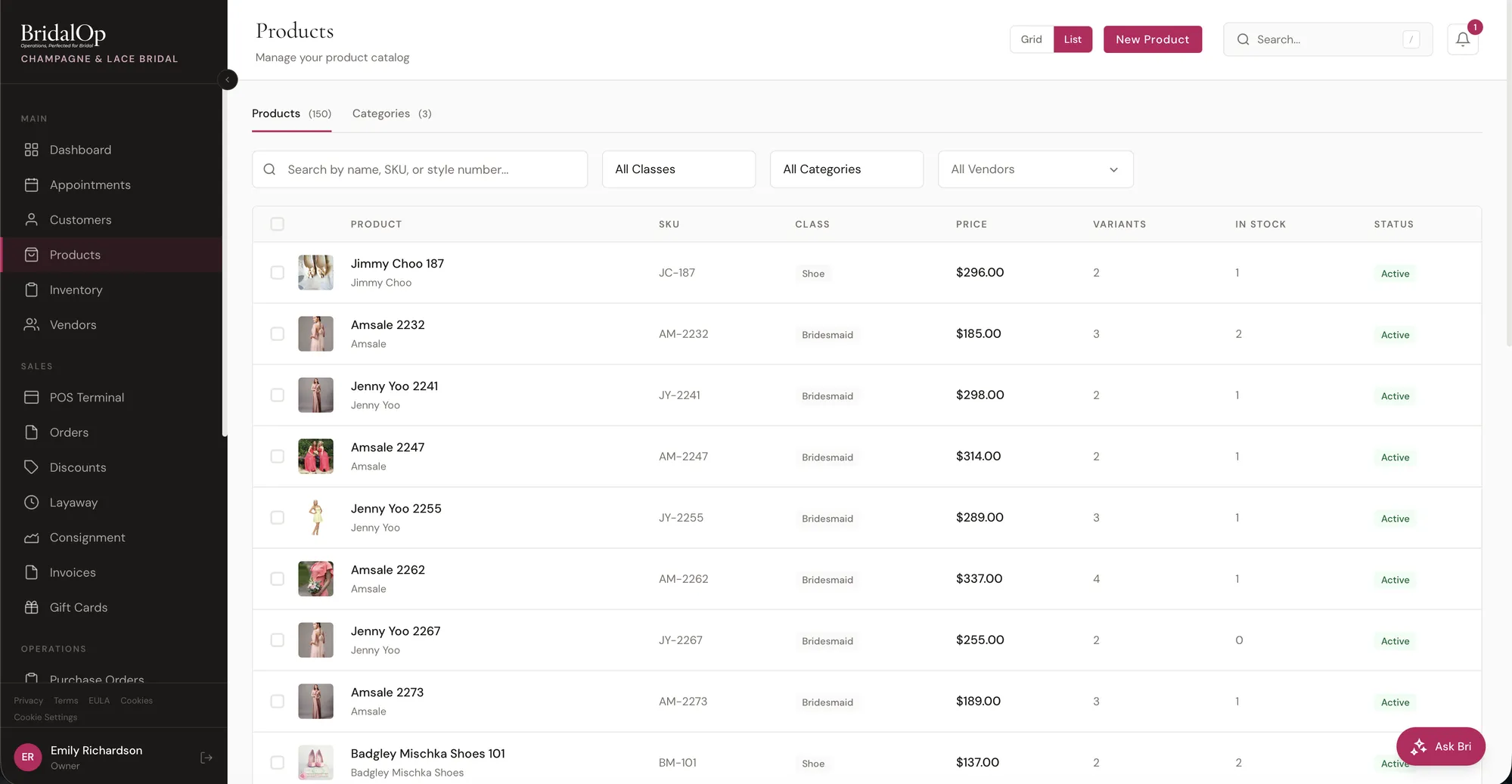
Bridal product catalog

Organize products by class: Gown, Bridesmaid, Prom, MOB, Veil, Shoe, Accessories, and more. Each with its own fields.

Product variants

Track size, color, and length as variants on a single product. Each variant carries its own stock count and price.

Per-variant images

Upload images for each variant so your team can see exactly what they're selling at the POS.

Barcode tracking

Auto-generated BO-XXXXXX barcodes for every item. Print barcode labels and scan at the POS for instant lookup.

Bulk actions

Select multiple products and change class, category, vendor, status, or delete in one action. Save hours on catalog cleanup.

Inline categories

Create and manage categories on the fly. No need to navigate away from the product you're editing.

Consignment tracking

Track consignment items with vendor splits. When an item sells, BridalOp calculates the vendor's share automatically.

Vendor color groups & size charts

Set a designer’s colours, size chart and pricing once on the vendor, and every product from them inherits it.

Low stock alerts

Get told the moment a line runs low, or as a single summary at 6 PM, with your own list of who hears about it.

Landed cost on purchase orders

Record shipping, duty, customs and handling per item or across a shipment, so the cost you report margin against is what the gown actually cost you.

Purchase order management

Create purchase orders with vendor payment terms. Track what's on order, what's arrived, and what's still outstanding.

Sell Online

Put the gowns already in your inventory on your own website. One stock number, kept right — whether the dress sells on your floor or at midnight on the web.

WooCommerce, FluentCart or Shopify

Connect the shop you already run. WordPress connects through a free plugin from the plugin directory; Shopify connects from inside BridalOp with nothing to install.

One stock number

A gown that sells on the floor stops being buyable online in about ten seconds. Prices and photos follow on the regular ten-minute sync.

You choose what goes up

Nothing is published until you tick Sell online on a product. Photos, sizes, colours and price go up with it.

Orders come back as real orders

Every paid online sale lands in BridalOp with the customer attached and that exact gown claimed, so it cannot be sold twice.

Refunds put the dress back

A refund or cancellation on your website returns the gown to your racks — and BridalOp tells you when a cancelled order still holds the customer’s money.

No double-counting in QuickBooks

If your website already posts online sales to QuickBooks, BridalOp won’t, so your revenue is never counted twice.

Special Orders

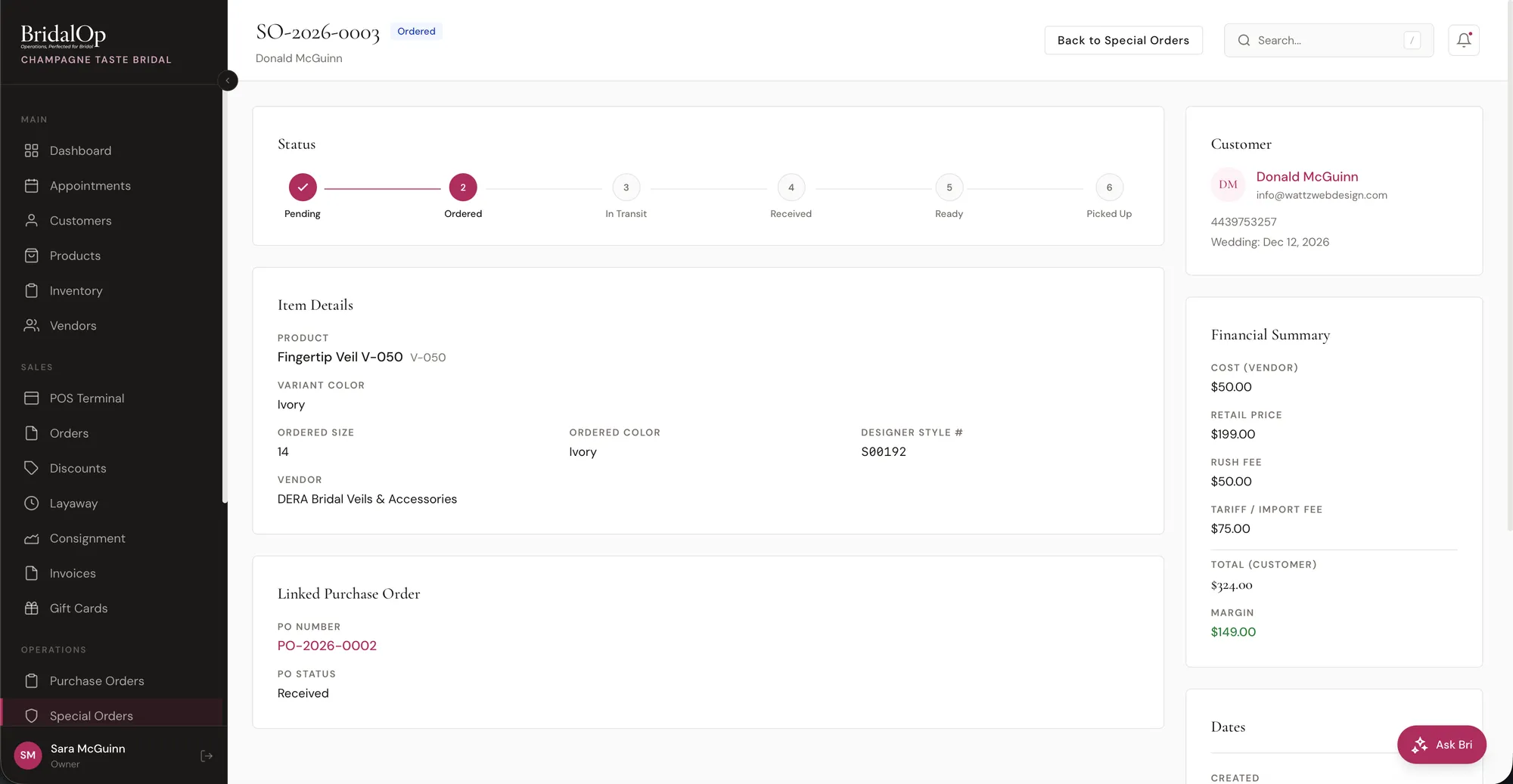
Track every special order from the moment a bride says yes to the day she picks up her gown. Never lose track of a single order again.

Special Orders

Full lifecycle tracking

Follow every order through its stages: pending, ordered, in transit, received, and delivered. Always know where things stand.

Linked records

Each special order links to its customer, product, vendor, and purchase order. One click to see the full picture.

Measurements & fees

Capture custom measurements, rush fees, and tariff fees on every order. Everything is recorded for the vendor.

ETA & promised-by dates

Set an estimated arrival date and a promised-by date for the customer. Get alerts when dates are approaching.

Auto-linked to PO lines

Special orders automatically link to purchase order lines for shipping and tracking. When the PO ships, the special order updates.

Prom Exclusivity

Keep the promise that no two girls from the same school leave your boutique in the same dress. Switch the Prom module on and BridalOp tracks it — leave it off and nothing appears anywhere.

Registered when it sells

Every prom dress sold to a girl with a school on her record is written against that school automatically. There is no list to keep, and a full refund gives the dress back.

Style and colour, never size

Two girls of different sizes wanting the same gown is the ordinary case, not a clash. Exclusivity belongs to the school, not the branch — downtown blocks uptown, because they go to the same prom.

Flagged long before the till

Dresses she cannot have are badged in the POS grid and on the product page, and her appointment carries the count — so the rail is pulled before she walks in.

Warn, block, or record silently

You decide how hard it pushes back, who may override it, and whether they have to give a reason. Every override is recorded with that reason.

A page girls can check themselves

She picks her school, searches a dress, and gets an answer — plus what is still free if it’s taken. It never reveals who has a dress.

Holds and a Prom Season report

Optional holds that expire on their own, so a forgotten one cannot block a school for a season. The report gives sales by school, the most spoken-for styles, and every override.

Invoices

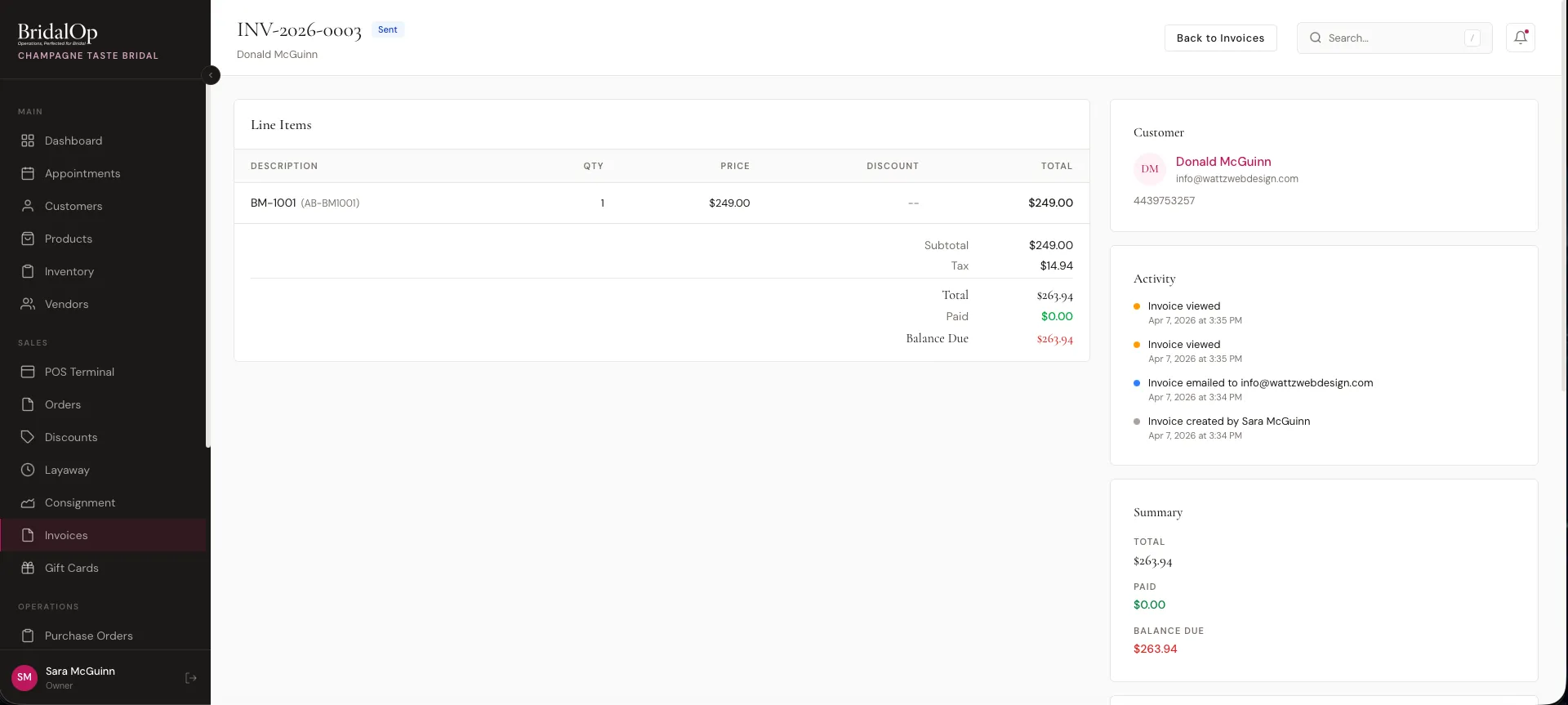
Create professional invoices, send payment links, and let customers pay online. Auto-charge on schedule so you never have to chase a balance.

Invoices

Line items & deposits

Build invoices with itemized lines, deposits, and custom payment schedules. Flexible enough for any pricing structure.

Public payment links

Send a link and the customer pays online from any device. No account required. Works with Stripe and Square.

Auto-charge on schedule

Set up a payment schedule and BridalOp charges the customer's saved card automatically on each due date.

Activity log

See exactly when an invoice was sent, viewed, and paid. Full transparency for you and your team.

Quotes

Send a pre-sale estimate with line items, totals and an expiry date, and a public page where she accepts or declines. Accepted quotes convert to a draft order or a payable invoice in one click.

Partial payments & balances

Accept partial payments and track the remaining balance. Customers can pay what they owe, when they can.

PDF export

Download any invoice as a polished PDF. Perfect for records, accountants, or customers who want a paper copy.

Contracts & E-Signatures

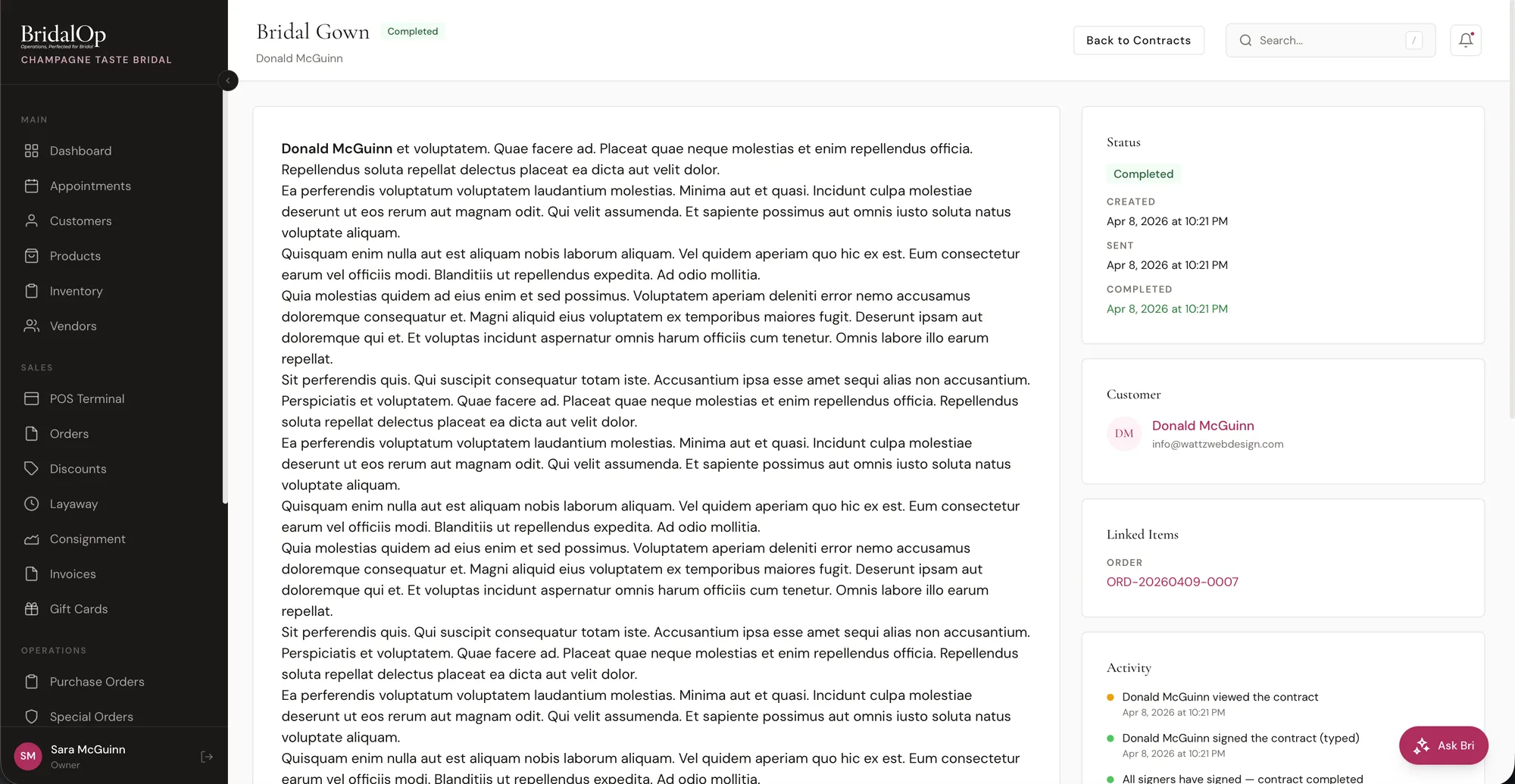
Create contract templates with merge tags, send signing links, or have customers sign right at the register. No more DocuSign fees.

Contracts

Template system with merge tags

Build reusable contract templates. Merge tags auto-fill customer name, order details, dates, and amounts.

Typed & drawn signatures

Customers can type their name or draw their signature with a finger or stylus. Both are legally binding.

Public signing links

Email a signing link and the customer reviews and signs from their phone or computer. No login needed.

In-store POS signing

Attach a contract to a POS sale and have the customer sign on-screen right at checkout. One smooth flow.

Activity log

Track when a contract was sent, viewed, and signed. Full audit trail for your records.

Multiple signers

Contracts can require signatures from multiple parties. Each signer gets their own signing link.

PDF download

Download signed contracts as PDFs with signatures, timestamps, and IP addresses embedded for your records.

Alterations

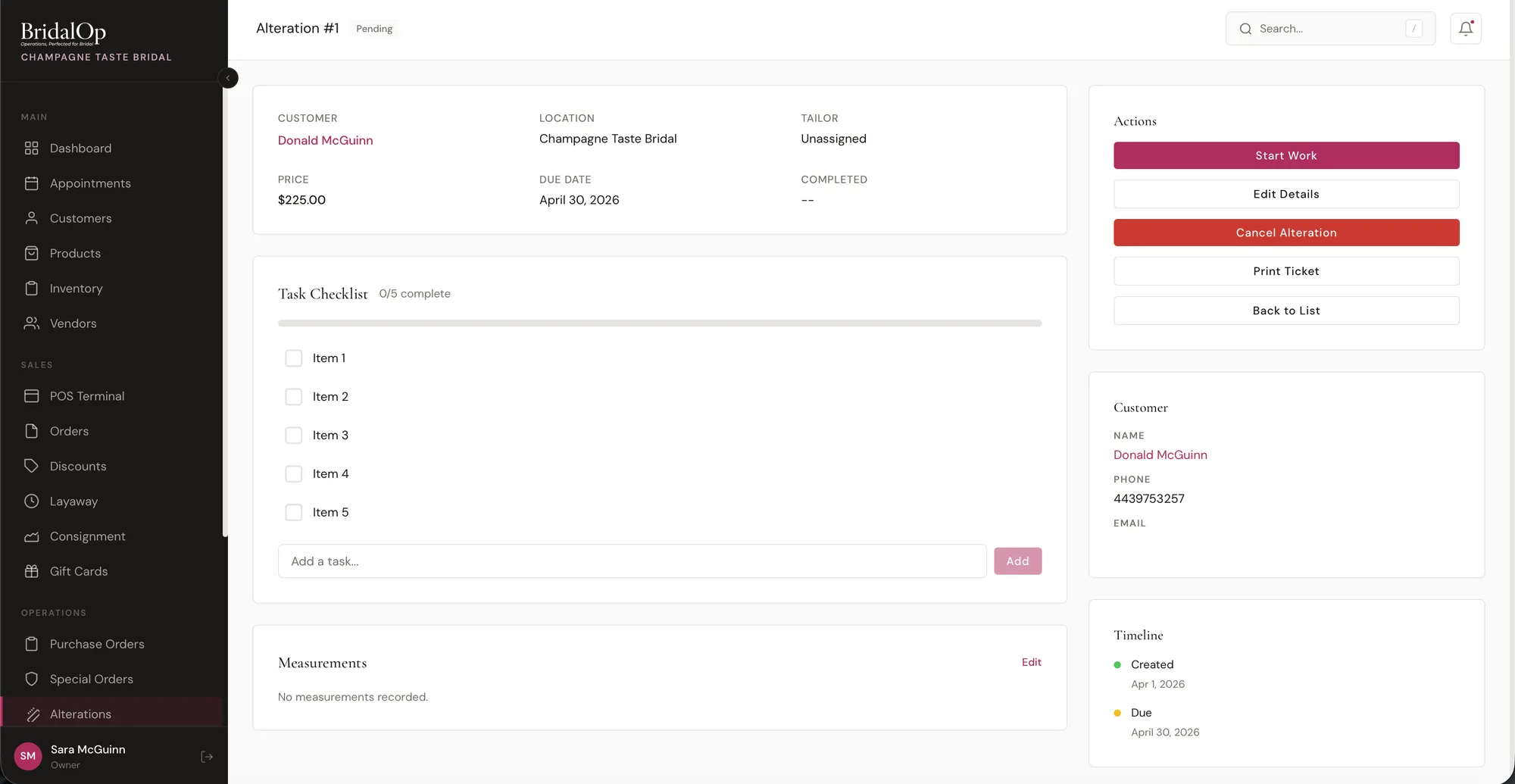
Manage alteration workflows with task checklists, tailor assignments, measurements, and customer notifications when their garment is ready.

Alterations

Track by customer

Every alteration is linked to a customer profile so you can see all pending work and history at a glance.

Assign tailors

Assign each alteration to a specific tailor on your staff. They see only their workload in their dashboard.

Task checklists

Break alterations into individual tasks with completion tracking. Hem, bustle, take in sides - check off each one as it's done.

Pickup notifications

When all tasks are complete, automatically notify the customer that their garment is ready for pickup.

Per-alteration pricing

Set pricing for each alteration task. Totals roll up so you can invoice the customer accurately.

Measurements tracking

Record bust, waist, hip, length, and custom measurements on each alteration for reference during fittings.

Gift Cards

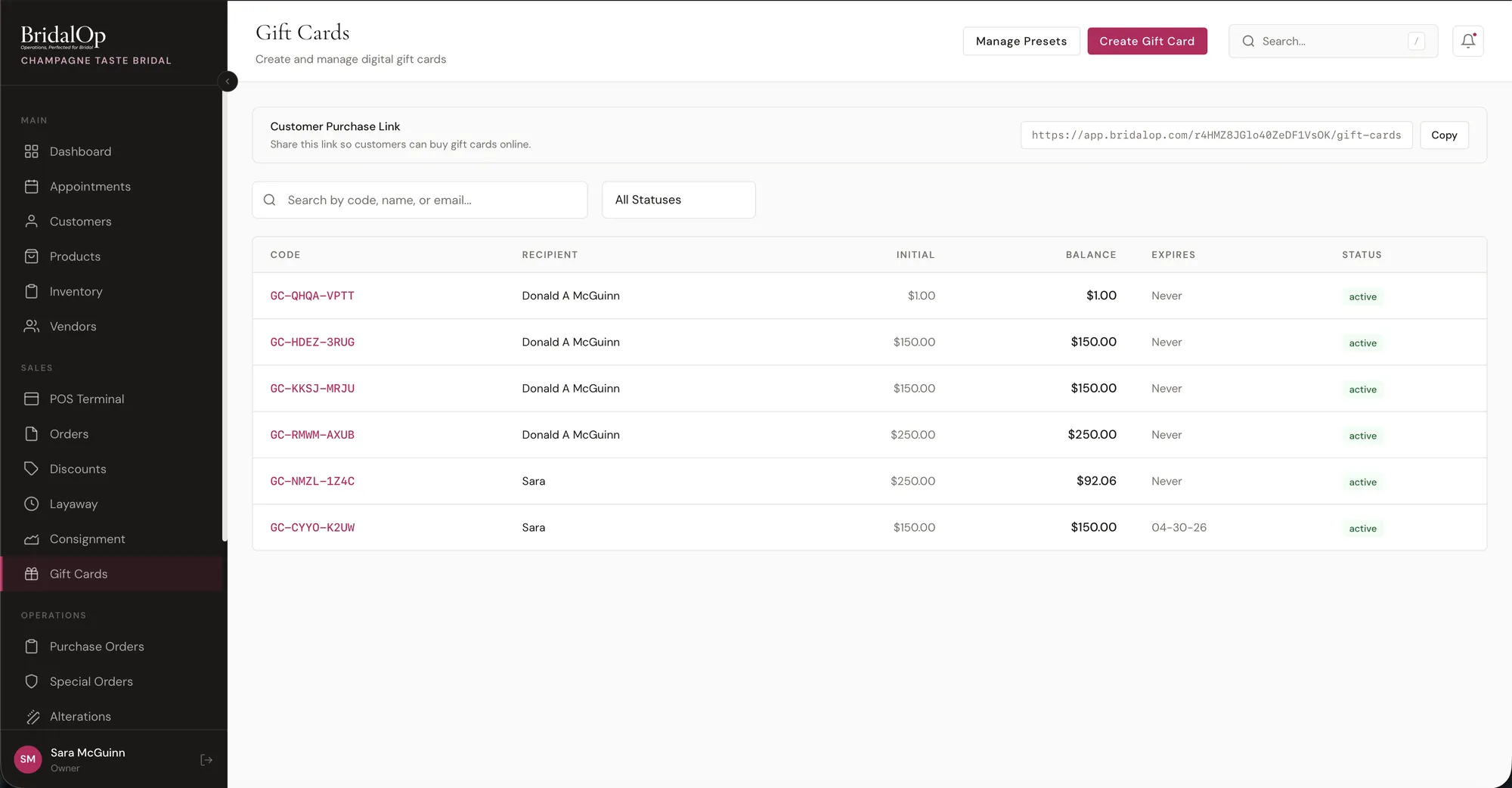
Sell gift cards in-store or online with a public purchase page. Track balances, send to recipients, and redeem at the POS.

Gift Cards

In-store & online sales

Sell gift cards at the POS or through a public purchase page on your website. Both channels, one system.

Auto-generated codes

Every gift card gets a unique, secure code automatically. No manual entry or duplicate worries.

Balance & transaction history

See the current balance and every transaction on a gift card. Know exactly how and when it was used.

Reload, deactivate, reactivate

Add funds, freeze a card if it's lost, or reactivate it when found. Full control over every gift card.

Email delivery

Send a beautifully branded gift card email directly to the recipient with a personal message from the buyer.

Redeem at POS

Customers enter their gift card code at checkout and the balance is applied instantly. Split payment with card or cash too.

Reports & Commissions

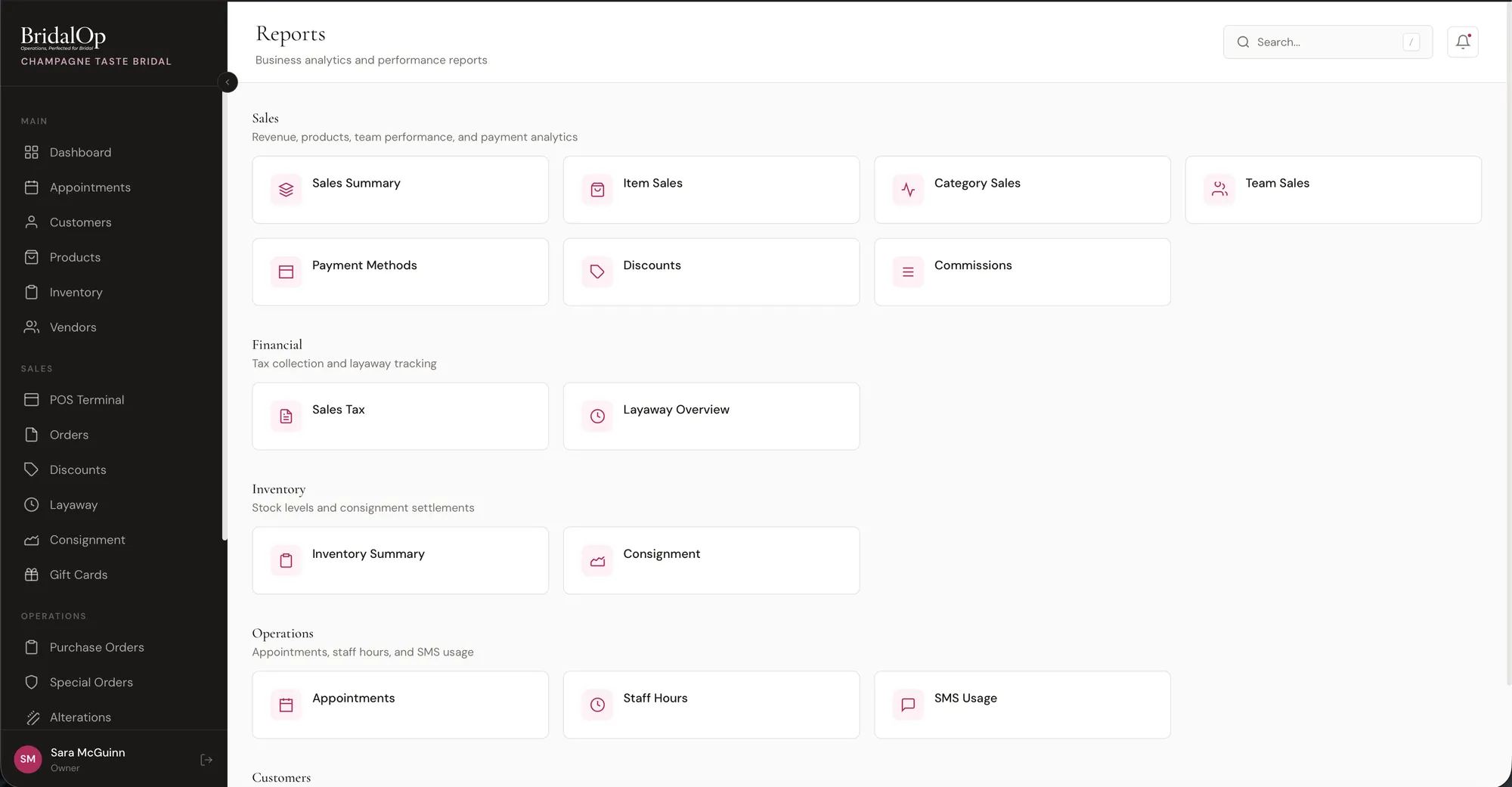
More than twenty built-in reports covering sales, margin, inventory, staff, customers, and expenses. Plus AI-powered natural language queries with Ask Bri.

Reports

Sales Dashboard

Seven KPI tiles on one screen — revenue this month, quarter and year to date with deltas, appointments booked, close ratio with a weekly sparkline, and margin by department. Every tile drills into the report beneath it.

Margin by department

Gross margin grouped by product type — gowns, bridesmaid, accessories, veils, shoes, alterations — with COGS and margin % per line. Costs are snapshotted at sale time so history never drifts.

Close ratio

Appointment-to-sale conversion over a window you choose, by store and by consultant, with a rule that stops repeat consultations inflating it. You pick which product types count as closing.

Sales by zip code

New customers, appointments, orders and revenue grouped by where your brides actually come from — the report that tells you where to spend on marketing.

Sales reports

Sales Summary, Item Sales, Category Sales, Payment Methods, and Discounts. See the big picture or drill into details.

Team & staff reports

Team Sales, Staff Hours, and individual staff performance. Know who's selling and how many hours they're working.

Financial reports

Sales Tax, Layaway balances, Inventory Value, and Consignment Payouts. Everything your accountant needs.

Customer & appointment insights

Customer Insights and Appointments reports show booking trends, conversion rates, and customer behavior patterns.

Inbound expenses with alerts

Track inbound expenses and set threshold alerts so you know when spending exceeds your budget in any category.

Commission tracking

Set per-staff and per-category commission rates. Rates are locked at sale time so historical accuracy is guaranteed.

CSV & PDF export

Export any report to CSV or PDF. Share with partners, accountants, or keep for your records.

Ask Bri (AI queries)

Type a question in plain English like "How many gowns did we sell this month?" and get an instant answer from your data.

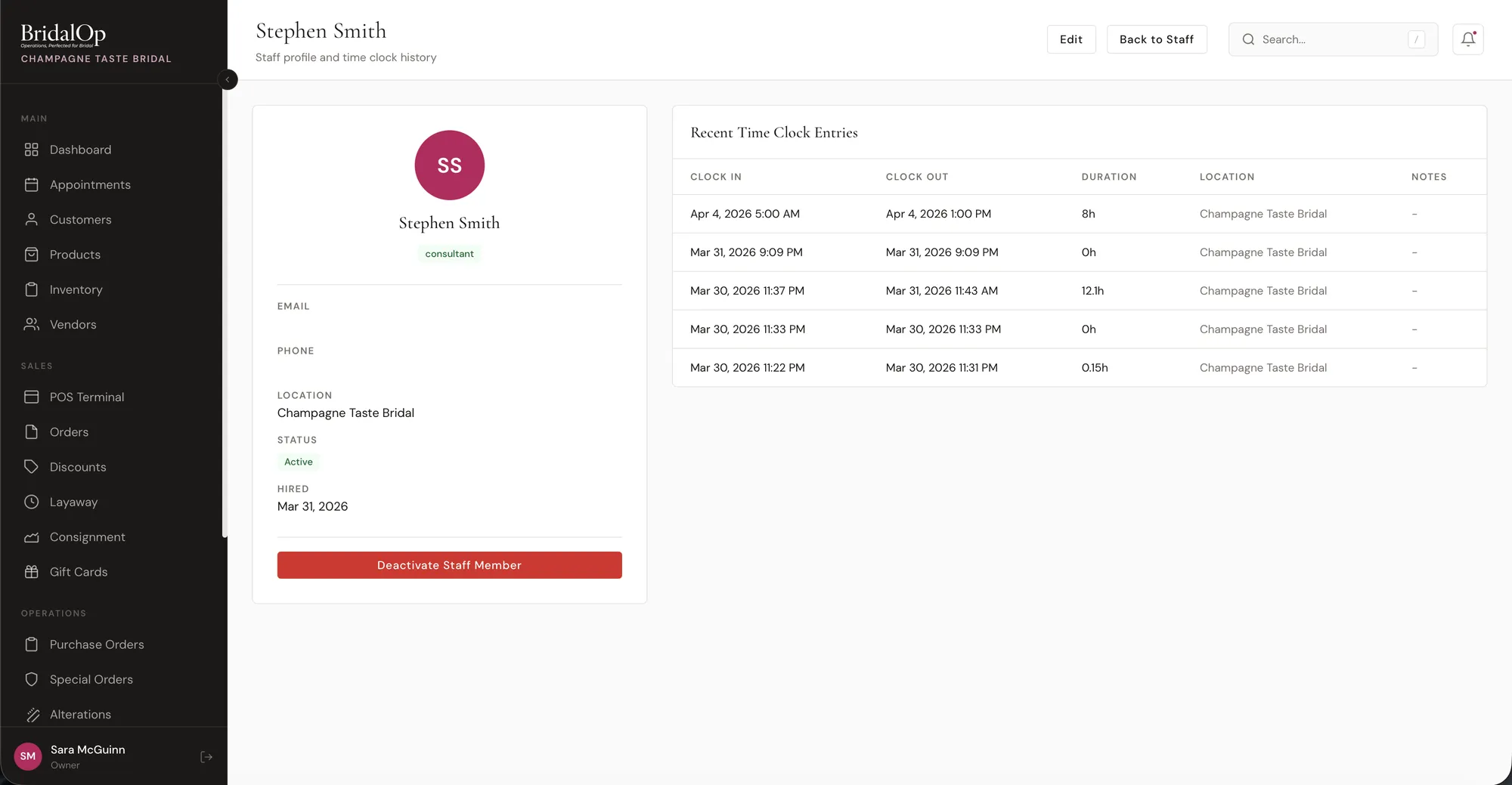
Staff & Time Clock

Invite your team, assign roles, set granular permissions, track hours, and manage commissions. Everything your staff needs under one roof.

Staff

Email invitations

Invite staff via email. They create their account and are immediately connected to your boutique.

Role-based access

Six built-in roles: Owner, Manager, Consultant, Tailor, Receptionist, and Accountant — each with sensible default permissions, and support for more than one owner.

Granular permissions

Override defaults with per-section CRUD controls and individual settings and report toggles. Full control over who sees what.

PIN clock in/out

Staff clock in and out with a personal PIN. Fast, secure, and works on any device in your shop.

Timesheet management

Review, edit, and approve timesheets. Managers see all hours, staff see their own. Simple and transparent.

Commission rates

Set a default commission rate per staff member, then override by category. Gowns at 10%, accessories at 5% - your call.

Grant another account access

Owners can let another BridalOp account switch into theirs with full administrator access — for a bookkeeper or a second boutique you own. They keep their own account and flip between the two. Revoke it any time.

Staff profiles

Each staff member gets a profile showing their commission earnings, hours worked, and sales performance.

Automations

When something happens in your shop, BridalOp does the next thing on its own — email, text, notify the floor, update a record, or send a contract. No third-party tools, no monthly Zapier bill.

Nineteen triggers

Appointments booked, cancelled, completed or no-showed. Sales, refunds, layaways, special orders, quotes, contracts, new customers, birthdays, and wedding dates approaching.

Conditions before it fires

Only for brides over a spend threshold, or one event type, or one appointment type. Leave conditions empty and it fires every time.

Steps with wait times

Stack actions in order, each with its own delay. Email now, text an hour later, notify the floor tomorrow.

Seven actions

Send an email or SMS, notify staff in-app, update a customer field or tag, move someone between categories, book a follow-up appointment, or send a contract to sign.

Start from a template

Eight ready-made automations — no-show follow-up, post-sale review request, 30-day wedding countdown — cloned in one click. They arrive switched off until you say otherwise.

Run history and audit log

See what fired, for whom, and what happened. A per-customer cooldown stops the same automation reaching someone twice.

Integrations

Connect the tools you already use. Payments, calendars, accounting, email marketing, and SMS - all synced automatically.

Stripe Square Google Calendar QuickBooks Mailchimp Flodesk MailerLite FluentCRM

Stripe & Square

Process card payments through your own Stripe or Square account. Connect in minutes, start accepting payments immediately.

Google Calendar

Two-way sync keeps your BridalOp calendar and Google Calendar in perfect harmony. Block time in either place.

QuickBooks Online

Automatically sync payments, invoices, and refunds to QuickBooks Online. No more double entry for your bookkeeper.

Email marketing platforms

Sync customers to Klaviyo, Mailchimp, Flodesk, MailerLite, or FluentCRM. New customers and opt-in changes flow automatically — and Klaviyo sign-ups come back the other way as BridalOp customers.

Online store

Publish your inventory to WooCommerce, FluentCart, or Shopify and keep one stock number across the floor and the web. See the Sell Online section.

SMS notifications

Send appointment reminders, order confirmations, alteration-ready alerts, and more via text message to your customers.

AI Assistant (Bri)

Meet Bri, your AI-powered assistant that lives on every page. Ask questions, look up data, and get instant answers in plain English.

B

Ask Bri

Online

How many gowns did we sell this month?
B
You've sold 47 gowns so far in April, totaling $68,420. That's up 18% from March.
Who's our top consultant?
B
Emily Richardson — 19 sales this month at an average of $1,780 per order.

Floating chat on every page

Bri is always one click away, no matter where you are in BridalOp. Open the chat and start asking.

Look up anything

Ask about customers, orders, appointments, inventory, invoices, and more. Bri searches your data and gives you the answer.

Natural language reports

"How many gowns did we sell this month?" or "What's our average sale value?" Bri answers instantly from your real data.

Navigation help

"Where do I change business hours?" or "How do I add a new staff member?" Bri points you to the right page.

Read-only & safe

Bri can look up data but can never modify it. Your data is safe - Bri is a viewer, not an editor.

Ready to see it in action?

Join boutiques already running on BridalOp. Set up takes minutes, not months.